
gpt-image-2
Generate images with GPT Image 2 (ChatGPT Images 2.0) inside Claude Code, using your existing ChatGPT Plus or Pro subscription — no separate OpenAI access, no per-image billing. Supports text-to-image, image-to-image editing, style transfer, and multi-reference composition via the local Codex CLI. Triggers on "gpt image 2", "gpt-image-2", "ChatGPT Images 2.0", "image 2", or any explicit ask to generate or edit an image through the user's ChatGPT plan.
- License 许可
- MIT
- 所属仓库
- mintuz/.dotfiles
- 最近更新
- 2026-11-13
- Stars
- ★ 3
- Forks
- 1
01 前言 Front Matter
- name
- gpt-image-2
- emoji
- ?
- license
- MIT
- homepage
- https://agentspace.so
- description
- Generate images with GPT Image 2 (ChatGPT Images 2.0) inside Claude Code, using your existing ChatGPT Plus or Pro subscription — no separate OpenAI access, no per-image billing. Supports text-to-image, image-to-image editing, style transfer, and multi-reference composition via the local Codex CLI. Triggers on "gpt image 2", "gpt-image-2", "ChatGPT Images 2.0", "image 2", or any explicit ask to generate or edit an image through the user's ChatGPT plan.
- displayName
- ? GPT Image 2 — Image Generation via Your ChatGPT Subscription
02 资源文件 6
- 资产文件gallery/a-poster.png440.2 KB
- 资产文件gallery/c1-logo.png263.8 KB
- 资产文件gallery/c2-tshirt.png2.3 MB
- 资产文件gallery/d-ukiyoe.png2.8 MB
- 脚本scripts/extract_image.py3.5 KB
- 脚本scripts/gen.sh4.6 KB
03 SKILL.md 正文
? GPT Image 2 — Image Generation via Your ChatGPT Subscription
Generate images with GPT Image 2 (ChatGPT Images 2.0) inside your agent, using your existing ChatGPT Plus or Pro subscription — no separate OpenAI access, no Fal or Replicate tokens, no per-image billing.
Text-to-image, image-to-image editing, style transfer, and multi-reference composition. Runs entirely through the local codex CLI you're already logged into.
Heads up — this skill requires a ChatGPT Plus or Pro subscription plus the Codex CLI installed locally. If you have neither, you can use GPT Image 2 in the browser via RunComfy instead — hosted, no ChatGPT subscription or local install needed (RunComfy account required):
- Text-to-image: runcomfy.com/models/openai/gpt-image-2/text-to-image
- Image edit (i2i): runcomfy.com/models/openai/gpt-image-2/edit
The rest of this document covers the local Codex CLI flow for agents whose user has a ChatGPT subscription.
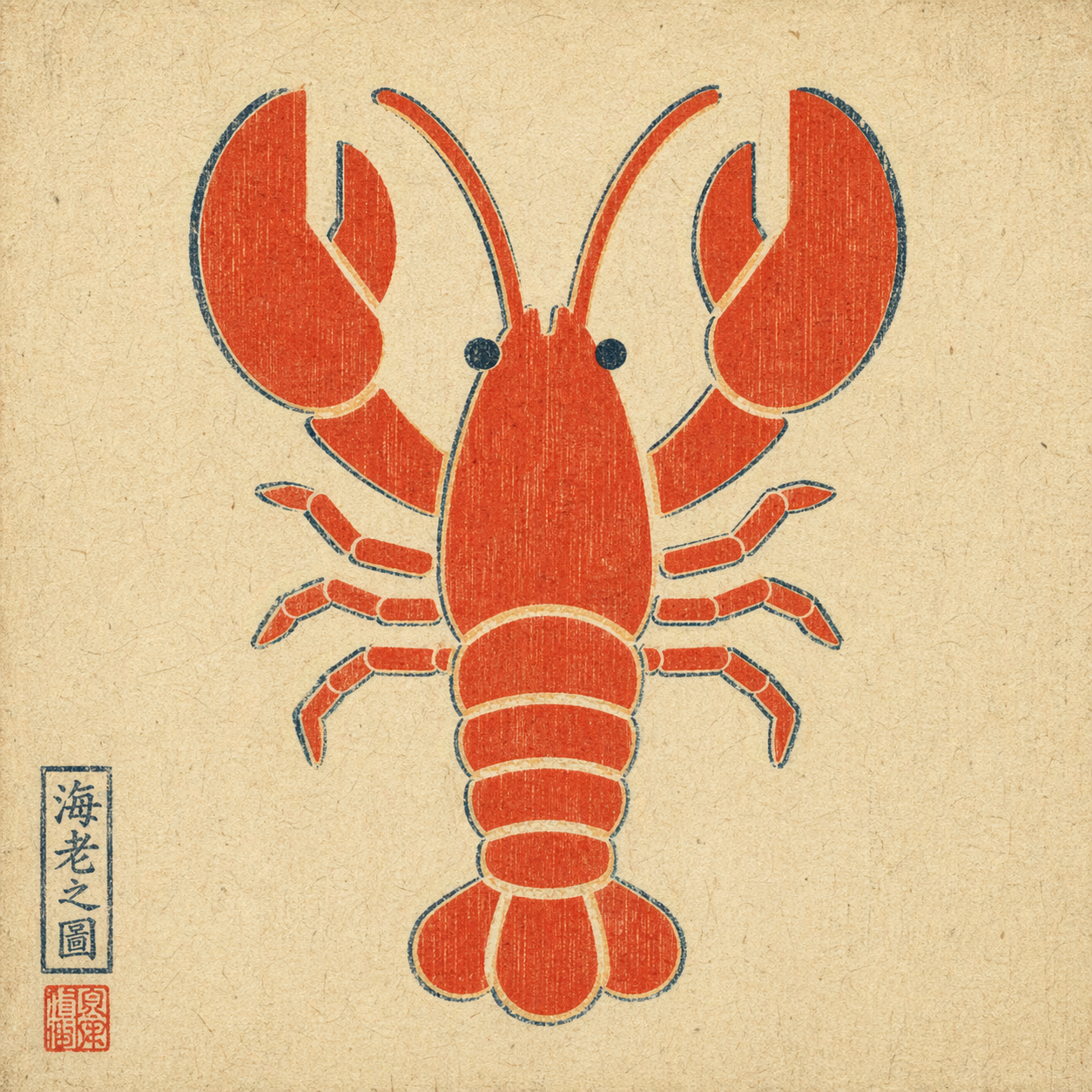
Example output: a plain flat-color icon repainted via --ref in ukiyo-e style — composition preserved, rendering swapped, period-appropriate red seal added by the model unprompted.
When to trigger
Trigger when the user explicitly asks for GPT Image 2 via their ChatGPT subscription, for example:
- "use GPT Image 2" / "use gpt-image-2" / "use ChatGPT Images 2.0"
- "use Image 2" / "image 2 this"
- attached a reference image and asked to remix / edit / restyle it
Do not auto-trigger for a plain "generate an image" request if the user didn't specify this route. If they did specify it, do not silently fall back to HTML mockups, screenshots, or a different image model.
How to invoke
A single bash script handles everything: runs codex exec with the right flags, then decodes the generated image from the persisted session rollout.
Text-to-image:
bash scripts/gen.sh \
  --prompt "<user's raw prompt>" \
  --out <absolute/path/to/output.png>
Image-to-image (reference flag is repeatable for multi-reference composition):
bash scripts/gen.sh \
  --prompt "<user's raw prompt, e.g. 'repaint in watercolor'>" \
  --ref /absolute/path/to/reference.png \
  --out <absolute/path/to/output.png>
Optional: --timeout-sec 300 (default 300).
Default behavior
- Pass the user's prompt through raw. Do not translate, polish, or add style modifiers unless the user asked for it.
- Choose the output path. Default to
./image-<YYYYMMDD-HHMMSS>.pngin the current working directory if the user didn't specify. - Deliver the image. After the script succeeds, display / attach the output file. Do not stop at "done, see path X".
- Text-heavy layouts are fine. Image 2 handles infographics and timeline prompts well. Do not preemptively warn just because a prompt has a lot of text.
Hard constraints
- Do not switch routes without permission. If the user said "use GPT Image 2", do not substitute DALL·E, Midjourney, an HTML mockup, or a manual screenshot workflow.
- Do not rewrite the prompt unless asked.
- Do not imply this skill works without a local
codexlogin and a valid ChatGPT subscription with image-generation entitlement.
Prerequisites
codexCLI installed —brew install codexor see openai/codex.- Logged in with a ChatGPT plan that includes Image 2 —
codex login. python3on PATH (ships with macOS;apt install python3on Linux).
This skill does not grant image-generation capability on its own. It exposes the capability the user already has through their ChatGPT subscription.
Exit codes
| code | meaning |
|---|---|
| 0 | success — output path printed on stdout |
| 2 | bad args |
| 3 | codex or python3 CLI missing |
| 4 | --ref file does not exist |
| 5 | codex exec failed (auth? network? model?) |
| 6 | no new session file detected |
| 7 | imagegen did not produce an image payload (feature not enabled, quota, or capability refused) |
On failure, name the layer in one sentence instead of dumping the full stderr at the user.
How it works
The codex CLI reuses the logged-in ChatGPT session and exposes an imagegen tool (gated behind the image_generation feature flag). The script:
- snapshots
~/.codex/sessions/before the run - runs
codex exec --enable image_generation --sandbox read-only ...(with-i <file>for each reference image) - diffs the sessions directory, then invokes
scripts/extract_image.pyto scan every new rollout JSONL for a base64 image payload (PNG / JPEG / WebP magic-header match) - decodes the largest matching blob and writes it to
--out
Two non-obvious flags other wrappers get wrong on codex-cli 0.111.0+:
--enable image_generationis required; the feature is still under-development and off by default.--ephemeralmust not be used — ephemeral sessions aren't persisted, so the image payload has nowhere to live.
Data handling
The script is narrowly scoped on purpose:
- It reads only session rollout files created by its own
codex execinvocation. The sessions directory is snapshotted before the call and diffed after, so any prior~/.codex/sessions/*files (which may contain unrelated Codex conversations) are never touched, read, or transmitted. - It writes only two kinds of file: the output PNG at the caller's
--outpath, and short-livedmktemplogs that are auto-deleted on exit via a trap. - No environment variables are read. No credentials are requested. No other paths under
~/.codex/are accessed. - No network calls leave this skill. The only outbound traffic is the one made by the
codexCLI itself (to OpenAI, using the user's existing ChatGPT login) — this skill does not add endpoints, telemetry, or callbacks.
What this skill is not
Not a direct OpenAI API client. Not a capability grant — it depends on the user's working Codex CLI login. Not a multi-tenant service (one call per invocation; concurrent calls are serialized by the filesystem-snapshot diff).
04 同仓库更多 Skills

no-ai-slop
Edit drafts into sharper, more human writing while preserving the writer's personal voice, or detect AI-slop patterns without rewriting. Use when the user wants a draft clearer, more direct, more opinionated, or less AI-sounding, or asks whether writing reads as AI.
define-goal
Help the user define a concrete, measurable goal before starting work, especially when they ask to use the goal tool, create a goal, set an objective, clarify success criteria, or turn a fuzzy intention into a quantitative outcome. Use this skill for goal creation and goal refinement only; it does not manage durable snapshots, decision logs, or long-running execution artifacts.
codebase-design
Design and evaluate deep modules: cohesive responsibility behind a small, stable caller-facing contract, with information hiding, justified seams, explicit effects, dependency strategy, and behavior-focused tests. Use when designing or changing an in-process module or package contract, consolidating shallow pass-through modules, deciding what to hide, comparing alternative interfaces, or asking whether code should be combined or split for leverage and locality. For physical layout use structure-codebase; for public compatibility use api-design; for a repository-wide scan use improve-codebase-architecture. For an already-selected whole-path requirement to support a calibrated net-mechanism-reduction claim, use reduce-system-complexity.
vercel-react-best-practices
React and Next.js performance optimization guidelines from Vercel Engineering. This skill should be used when writing, reviewing, or refactoring React/Next.js code to ensure optimal performance patterns. Triggers on tasks involving React components, Next.js pages, data fetching, bundle optimization, or performance improvements.
vercel-composition-patterns
React composition patterns that scale. Use when refactoring components with boolean prop proliferation, building flexible component libraries, or designing reusable APIs. Triggers on tasks involving compound components, render props, context providers, or component architecture. Includes React 19 API changes.
clarity
Draft, rewrite, or review reader-facing prose so it is specific, useful, and recognizably the author's without inventing facts or performing humanness. Use for essays, articles, newsletters, documentation, talks, launch copy, and other important prose that feels generic, hollow, or AI-shaped. Supports co-write, rewrite, review, and lint modes.